PROBLEM:
Specific language characters (such as cyrillic letters) are not shown properly in Urbano. Some functions interpret those characters properly, some don't. For example, if the user types such characters in configuration of long section, program will change those characters in some others, or in ????? chacters when refreshing.
DETAILED DESCRIPTION:
AutoCAD does not support UNICODE, so it shows all non-standard characters (that are set in the drawing, not in the menus of the program) according to the current code page set in Windows operating system. Characters on menus and ribbons of the program will be shown properly, regardless of code page, as those are "burnt" into the software.
How to set up proper code page and resolve this problem? Go to Control panel - Region in Windows operating system that has been set as the default one for reading characters for Non-Unicode programs. It must be set to the language that you want to use inside Urbano. For example, set BULGARIAN to be able to see Cyrillic letters.
- Close Urbano and AutoCAD and all DWG files, because you will have to restart the computer after following steps.
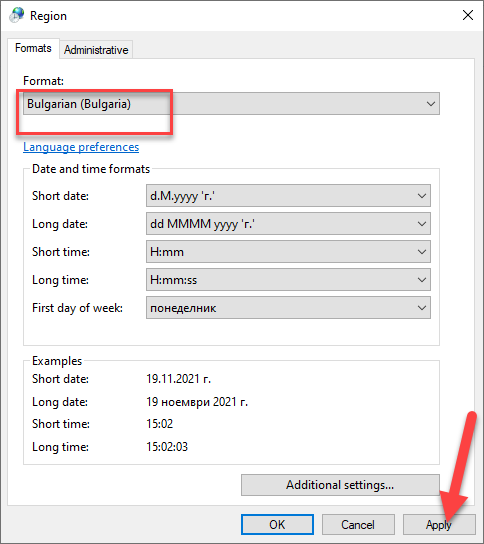
- Go to Control Panel - Region:
- Set format to Bulgarian – APPLY:
- Go to ADMINISTRATIVE tab and CHANGE SYSTEM LOCALE to BULGARIAN:
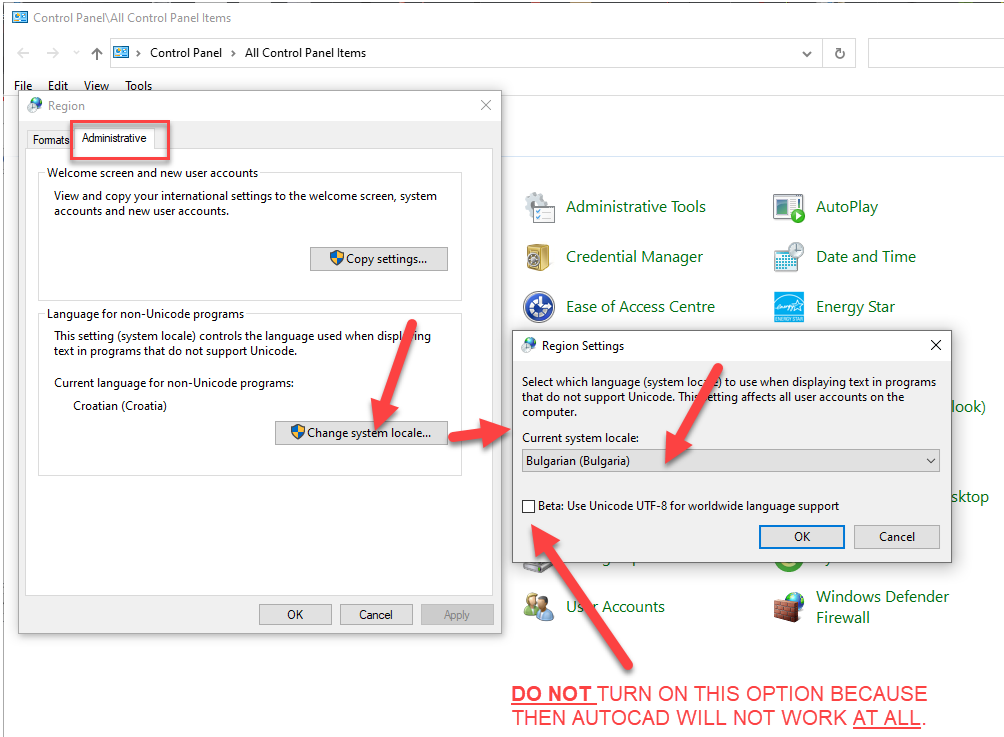
- Restart computer, open Urbano and it will all work properly.
Was this article helpful?
That’s Great!
Thank you for your feedback
Sorry! We couldn't be helpful
Thank you for your feedback
Feedback sent
We appreciate your effort and will try to fix the article